Business Domain Solutions

Digital Banking Channels

Mobile and internet banking journeys for retail customers and business teams.

Retail self-service, business payment workflows and channel administration can be selected for the institution’s needs. These functions connect to underlying banking systems.

Retail and business channel services
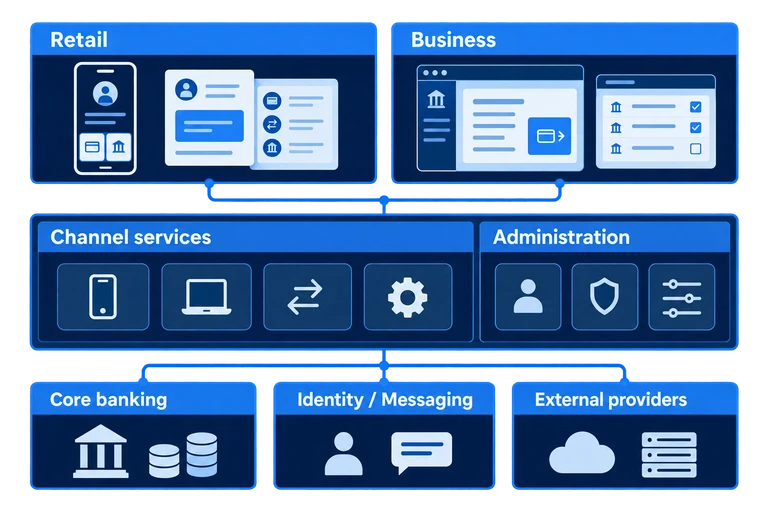
Retail customers and business teams use scoped mobile and browser services. Channel services and administration connect to core banking, identity, messaging and external providers through agreed interfaces.
02 / Situations

Keep account enquiries and business payments connected.

  1. 01

    One customer action often leads to another service

    A balance enquiry may lead to a transaction search, a fee enquiry, a statement or a question about the result.

    The channel needs to connect information and help while retaining the account and transaction context.

  2. 02

    One business transaction involves several people and stages

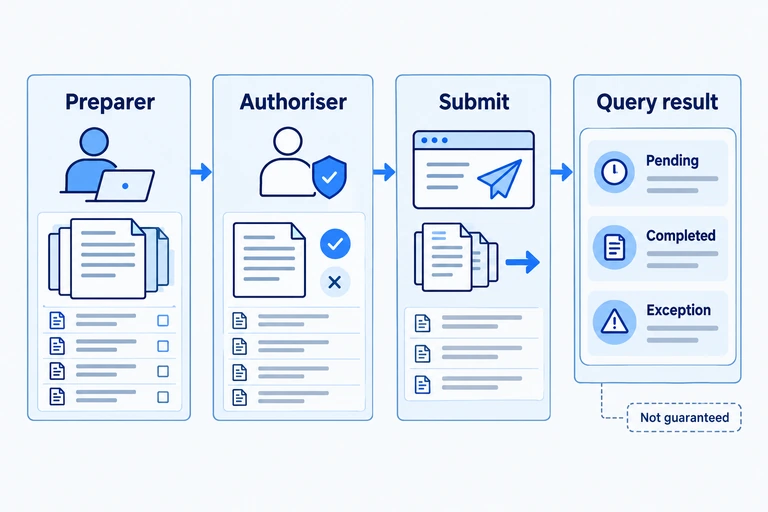
    An officer prepares a payment, authorised colleagues review it, and the team follows up on execution, fees and records.

    They need to understand the current stage and what still requires attention.

  3. 03

    Customer communication needs ongoing administration

    Notices, messages, promotional content and app-version information need coordinated management.

  4. 04

    Channel controls need clear operating responsibilities

    Permissions and customer-facing services must align with the bank’s rules, connected systems and operating teams.

03 / Value

Make everyday banking and team payments easier to manage.

01

Connect everyday banking with engagement

Connect accounts and transactions with results, help and customer programmes.

Configure content and optional rewards; personalised recommendations require development.

How it works

Retail engagement

Account overviews, filtered transaction details and statements support everyday enquiries.

Messages, notices, promotional placements and optional rewards provide different ways to engage customers.

Administrative tools maintain content, placement, effective dates and related rules.
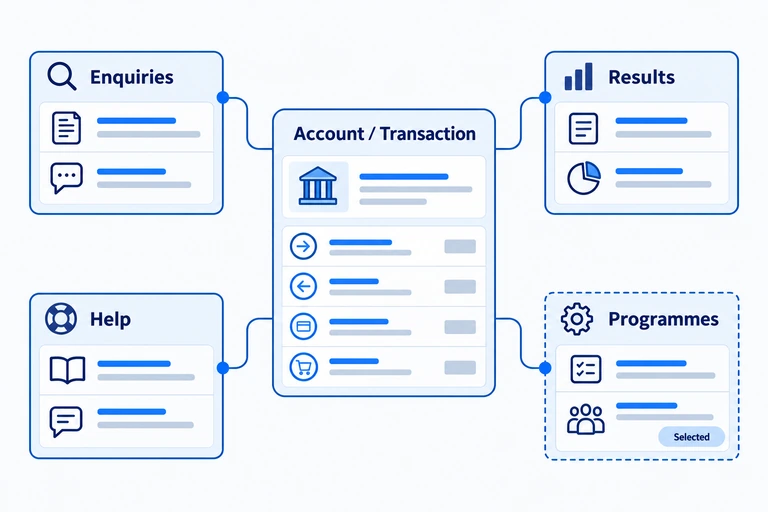
Account and transaction enquiries connect to results, help and selected customer programmes. Modules and optional engagement features are scoped for the project.
02

Support collaborative business payments

Connect preparation, authorisation and payment results with clear team responsibilities.

Agree approval rules and execution conditions; scope business services separately from retail.

How it works

Business collaboration

Business teams work through payee maintenance, single and bulk payments, approval queues and scheduled arrangements.

Summary and individual-item views show status, next actions and records needing attention.

Preparation, authorisation and submission are separate responsibilities. Processing status and final results must be checked; approval does not guarantee successful payment.
03

Review transaction results and records

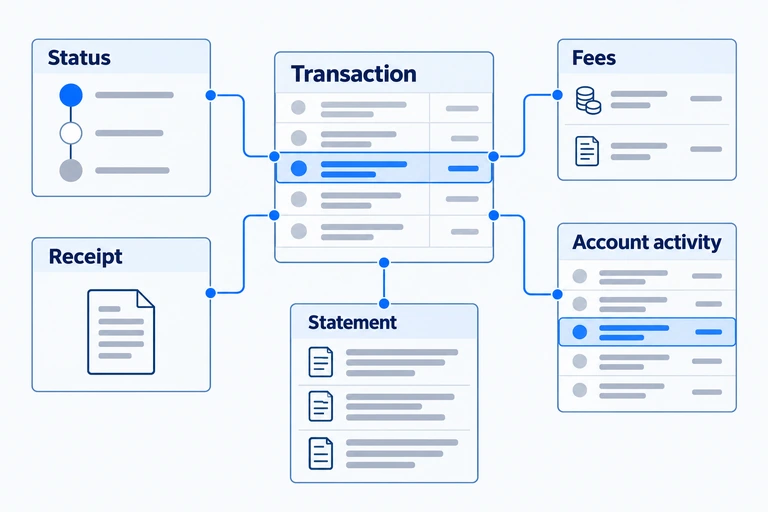
Bring status, fees, receipts and statements together for follow-up checks.

Scope certified documents, reconciliation automation and ERP connections separately.

How it works

Results and records

Retail customers inspect transaction details and messages.

Business users review batch and item-level results, associated fees and receipts, and export agreed records.

Unmatched collections follow the relevant suspense-handling process.

Bring status, fees, receipts, account activity and statements into transaction follow-up. Certified documents, reconciliation automation and ERP connections are separately scoped.
04

Align services with bank administration

Coordinate personal access, business approvals and bank administration.

Define self-service, fraud controls and channel coverage for each role.

How it works

Bank administration

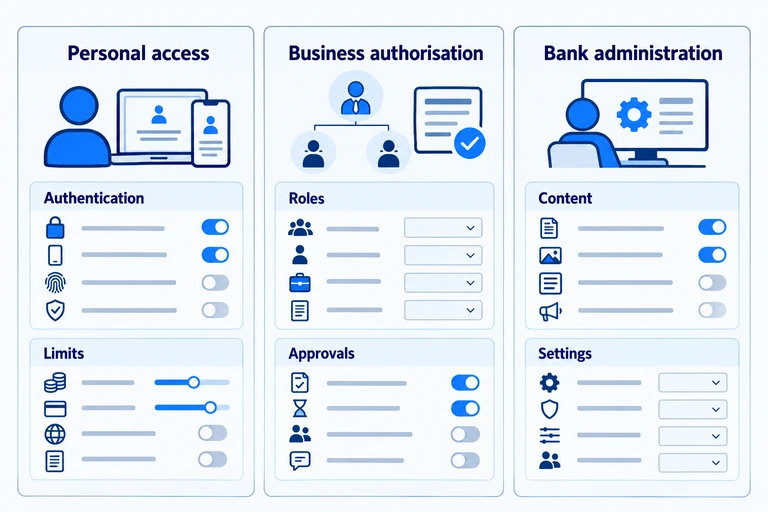
Retail scope can include PINs, authentication, limits and device requests.

Business scope covers user roles and approvals.

Bank teams maintain related content, settings, records and operating actions.

Each set of controls depends on its design and connections.

Personal access, business authorisation and bank administration have distinct responsibilities. Their controls and connections are designed within the agreed implementation.
04 / Scope and functions

Choose services for retail customers and business teams.

Select modules for the customer group, channel and project, with functionality and shared services defined for each implementation.

Account access, everyday transactions, personal settings, messages and selected customer programmes.

01

Registration, Account Access and Personal Settings

Register and sign in, access accounts and manage personal access settings.

Explore functions (4)
  • Collect the personal details, mobile verification, identity inputs and credentials needed for account opening or registration.
  • Sign in with username/password or supported biometric methods.
  • View multiple accounts, balances and account details.
  • Access profile information, password/PIN management, transaction limits and device-related actions.
02

Transactions, Enquiries and Service Entry Points

Access agreed transactions and inspect account activity and related information.

Explore functions (5)
  • Filter account history by period, order and transaction type.
  • View transaction references, counterparties, amounts and fees.
  • Select a period to view or download an ordinary account statement.
  • Connect transfers, bill payment, mobile top-up, deposit and loan entry points, and agreed card services.
  • Include repayment records and schedules where the relevant service is connected.
03

Messages, Help and Customer Programmes

Bring service communication and agreed customer programmes into the everyday channel.

Explore functions (5)
  • Provide notices, push, inbox and in-app notifications.
  • Present FAQs, contact information, terms, privacy and customer-protection content.
  • Manage promotional placements such as splash-screen advertisements and home pop-ups.
  • Add optional event-based points rules and reward activity.
  • Maintain messages, banners, front-end content, placement dates and app-version information through administrative functions.
05 / Foundation and delivery

Products, connections and delivery

Products behind the solution

Digital banking channels

Mobile apps and browser channels around customer tasks.

Retail service & engagementBusiness payments & collections

Channel services

Account access, transactions, identity, messages and records.

Administration & technology

Content, settings and operating actions. Bankware Mobile provides channel-integration technology; application and module scope is agreed for the project.

Agreed APIs & interfaces

Data mappings, transaction states and responsibilities

Connect the channel ecosystem

Core banking

Connect account and transaction services to the bank’s underlying core, including Digital Bank Suite where selected.

External services

Agree payment, card, identity and messaging connections with the relevant providers.

Existing channels & operations

Retain, adapt or replace apps and portals. Define permissions, data ownership, hosting, monitoring and support.

Logical interface view. Modules, applications and connections are agreed for each implementation; a common service layer does not imply identical channel functionality.

Design, connect and launch

  1. Step 1

    Define & design

    Agree users, tasks and mobile/web scope. Design the experience and select modules, adaptations and software deliverables.

  2. Step 2

    Connect & validate

    Implement interfaces and data mappings. Validate transaction states, permissions and security through integration testing and UAT.

  3. Step 3

    Release & hand over

    Plan user and history migration, app or web release, operational handover and agreed maintenance responsibilities.

06 / Evidence

Mobile services for customers and field teams.

BPI BanKo

Banking channels for customers, agents and collectors

Philippines · Customer, agent and collector apps

Bankware supported BPI BanKo with customer, agent and collector mobile apps connected to its banking platform.

07 / Contact

Start with the customer tasks your channels need to serve.

Tell us who you serve, the everyday experience or business workflow you want to improve, and your existing apps, portals, core and external services.

Discuss the channel combination, modules, administration, project adaptations and operating support, with clear delivery and validation responsibilities.